.avif)

Blog Summary
- Where to find and download your postponed VAT statement on HMRC's site
- Why the statement matters for boxes 1, 4 and 7 on every VAT return
- What to do when a statement is late, missing, or wrong
- How a dedicated accountant with AI review catches PVA errors early
INTRODUCTION
Every accountant with import clients knows the scramble. The VAT deadline is two days away. The postponed VAT statement still has not appeared.
Your team cannot fill in boxes 1, 4 and 7 without it. The return sits half done. Someone hunts through HMRC's portal for a file that is not there yet.
This guide shows you where the postponed VAT statement lives. It shows you when HMRC releases it. It also shows you what to do when the statement does not turn up.
You will also see how a dedicated remote accountant, backed by AI review, can take this chase off your plate for good.
WHAT IS A POSTPONED VAT STATEMENT?
A postponed VAT statement is HMRC's monthly online record of your postponed import VAT. It sits inside your postponed VAT accounting setup.
It lists every import linked to your EORI number for the month before. You use these figures on your VAT return. You do not pay import VAT upfront at the border.
Postponed VAT accounting became standard for most GB importers after Brexit. Before that, many businesses paid import VAT straight away. They then reclaimed it later with a C79 certificate.
HMRC built the scheme to protect cash flow. Paying VAT at the border and waiting weeks to reclaim it tied up cash that many firms could not spare.
The statement swaps that paper trail for a digital one. But it only stays online for six months. Timing matters.
Not every business gets this automatically. You choose postponed VAT accounting when you make the customs declaration. Your customs agent needs to know you want it.
WHY DO ACCOUNTANTS NEED THE POSTPONED VAT STATEMENT?
Accountants need this statement to file an accurate VAT return. Without it, boxes 1, 4 and 7 are guesswork.
Box 1 shows VAT due on imports for the period. Box 4 shows the VAT reclaimed on those same imports. Box 7 shows the total value of the goods, minus VAT.
If the statement is missing at filing time, HMRC expects you to estimate the figures. You correct them later. That means two filing rounds instead of one. It also raises the risk of an HMRC query.
Most practices work inside Xero, QuickBooks, Sage, or any other software. The statement is the raw data behind that software. Get it wrong once, and every number that follows is wrong too.
There is a cash flow point worth explaining to clients. Boxes 1 and 4 usually cancel each other out. Most import VAT has no real cash cost on the return. Clients who see a big box 1 figure often panic. A short explanation calms that down fast.
Skipping the reconciliation step brings a second risk. Wrong figures in box 7 feed into HMRC's trade data. Repeated errors can put a client on HMRC's radar.
There is a client trust angle too. A client who gets a surprise VAT bill, caused by a missed statement, loses confidence fast. A steady monthly process protects that trust. It also protects your fee.
WHO CAN ACCESS A POSTPONED VAT STATEMENT?
Only the business itself can view its own statement. It needs its own Government Gateway login. HMRC does not open this dashboard to agents alone.
This surprises many practices. You can file a VAT return as an agent. But you usually need the client's own login, or a shared process, to see their statement first.
For a practice with many import clients, this adds up fast. Someone has to chase each client for access. This happens every month, right before the deadline.
An agent services account lets you file the VAT return. It does not give you access to the client's Customs Declaration Service dashboard.
Some practices solve this with a shared login set up just for practice use. Others run a monthly checklist that reminds each client to forward their statement. Neither method is perfect. This is why missed statements are such a common cause of late filing.
VAT groups add another wrinkle. If several companies share one VAT number, only one member's statement may show the group's postponed VAT. Check which entity HMRC treats as the lead member before you assume a figure is missing.
Sole traders often assume their software pulls this data on its own. It does not. Xero, QuickBooks, Sage and any other software all rely on you to fetch the statement from HMRC first.
WHEN DOES HMRC PUBLISH THE POSTPONED VAT STATEMENT?
HMRC aims to publish the statement by the sixth working day of the month. It covers imports from the month before.
In practice, many statements land closer to the tenth working day. This gap between the target date and the real date is why deadline planning matters so much.
Statements stay online for six months from the day HMRC publishes them. After that, the standard dashboard will not show them. Download and save each one as soon as it appears.
HMRC's own update history lists several cases of delay. Sometimes technical issues push a statement back by a week or more. When this happens, HMRC usually posts a corrected version on the same dashboard. It does not always send a new alert.
This is why a passive approach fails so often. Waiting for the statement to just show up wastes time. A practice that checks the dashboard early, around day six, catches delays sooner. That leaves time to plan around them.
WHERE DO YOU FIND THE POSTPONED VAT STATEMENT ON HMRC?
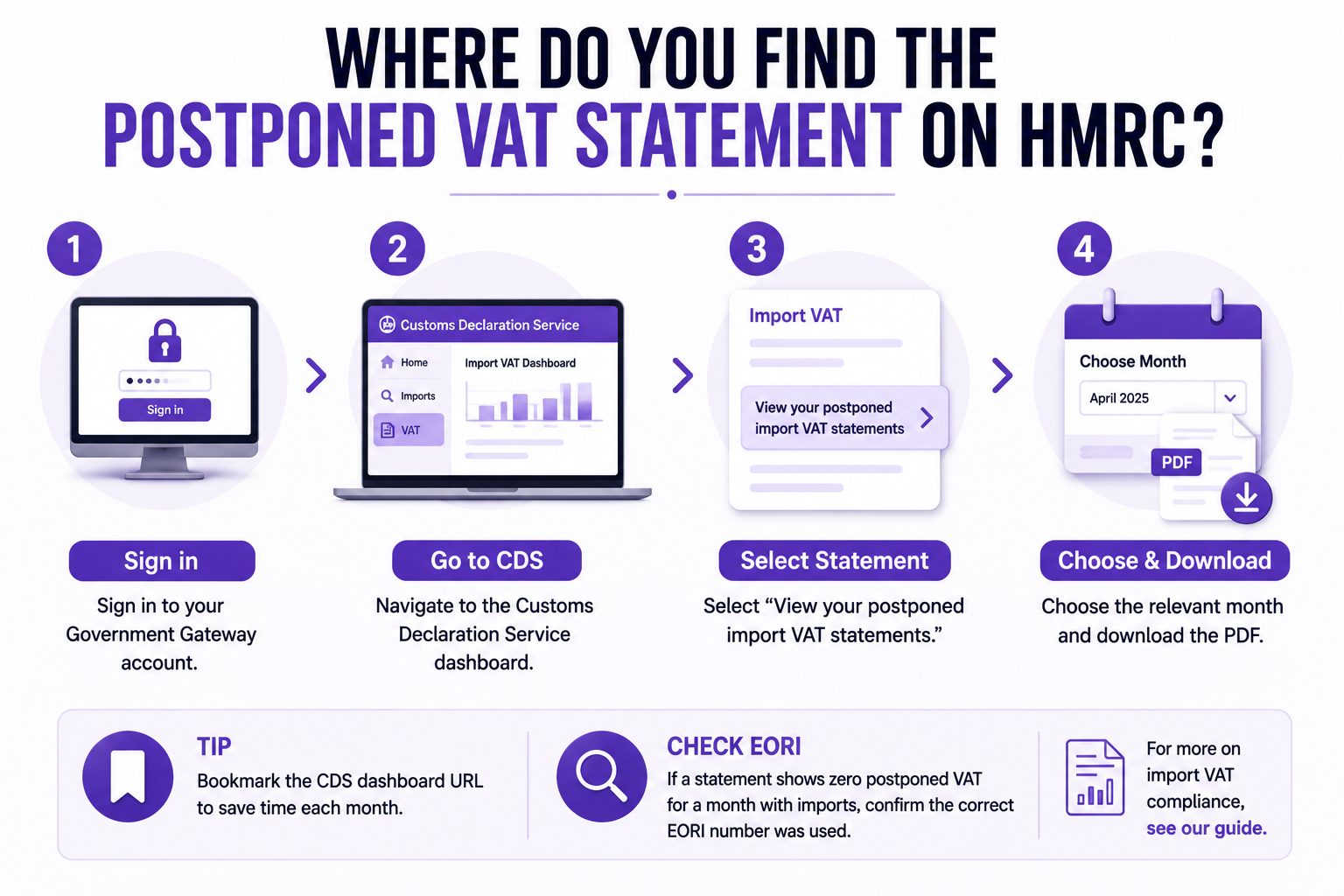
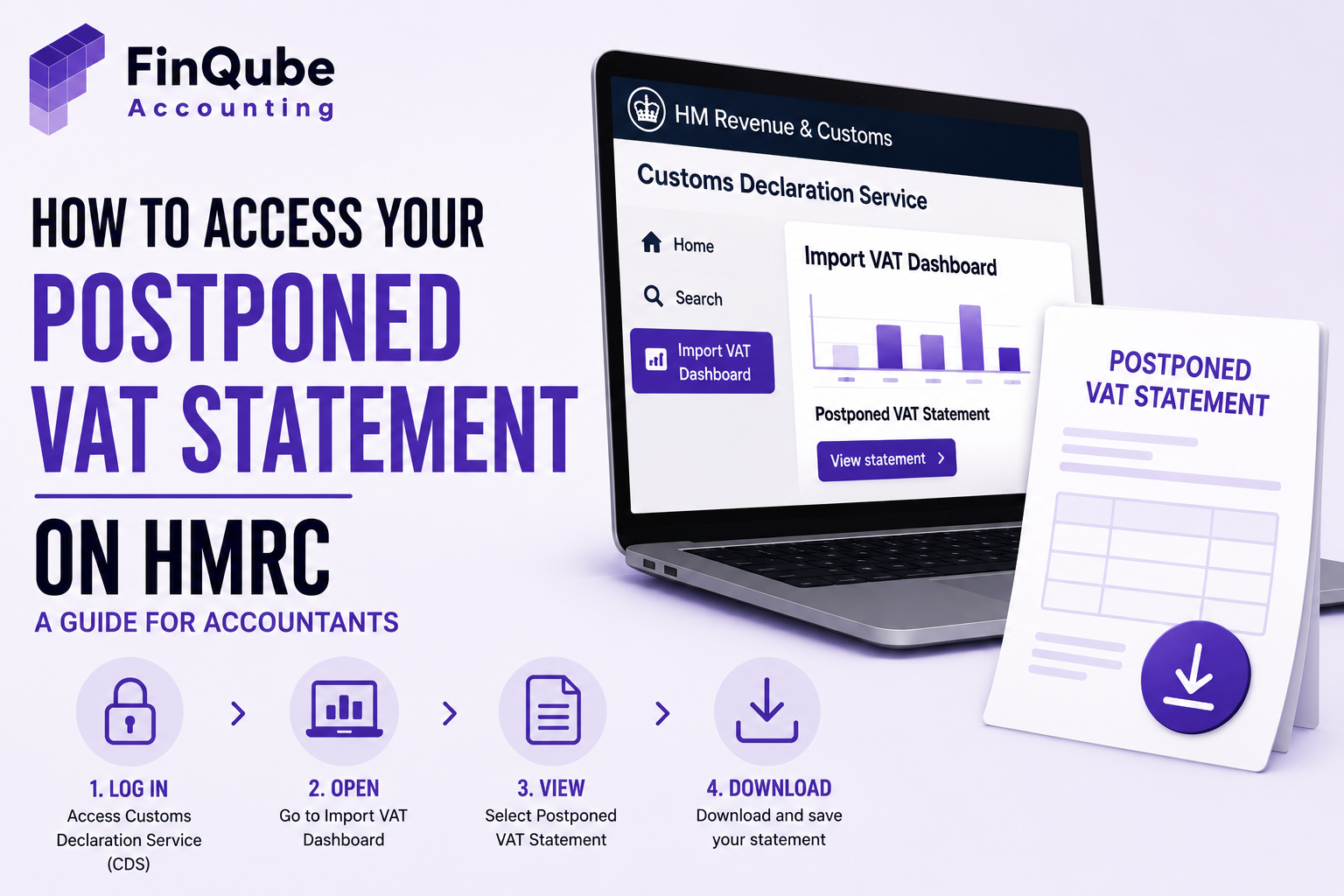
You find the statement inside the Customs Declaration Service. You reach it through your Government Gateway account.
Follow these four steps. First, sign in to Government Gateway. Second, open the Customs Declaration Service dashboard. Third, select "View your postponed import VAT statements." Fourth, pick the month you need and download the PDF.
If your business has not signed up for the Customs Declaration Service, you will not see the statement at all. Signing up is free, but it takes time to process. Do this well before your first import.
Save the dashboard link rather than searching for it fresh each month. HMRC sometimes changes its menus. A saved link avoids wasted time during a tight deadline.
If a customs agent clears goods on your behalf, check which EORI number they used. A statement showing zero postponed VAT, despite known imports, usually points to this mismatch.
For more on the wider rules, read our guide to postponed VAT accounting.
HOW DO YOU DOWNLOAD AND RECONCILE A POSTPONED VAT STATEMENT?
Download the statement as a PDF from the Customs Declaration Service. Then check its figures against your own import records before you file the VAT return.
Start by checking that every import you expect actually appears. A missing entry often means the wrong EORI number was used. It might also sit on a VAT group member's statement instead.
Next, match the total postponed VAT figure to your bookkeeping software. This applies whether you use Xero, QuickBooks, Sage, or any other software. A mismatch here is your earliest warning sign.
Finally, save a copy outside HMRC's portal. Six months goes by fast, especially in a busy filing season.
If your firm also supports Making Tax Digital clients, read our MTD VAT compliance UK guide.
If a check turns up a genuine HMRC error, raise it through HMRC's online services or the VAT helpline. Keep proof of the customs declaration ready before you call.
COMMON PROBLEMS WITH THE POSTPONED VAT STATEMENT
Most problems with this statement fall into a few repeat patterns. Spotting the pattern speeds up the fix.
A missing statement often means one thing. The business has not finished Customs Declaration Service sign-up. Or the import used the wrong EORI number. Check both before you assume HMRC lost the data.
A low figure often means some imports used a C79 certificate instead of postponement. Mixing both methods in one VAT period is normal. It is not an error. But it does need separate checks.
A statement that never turns up by day ten, with no fix posted, is worth a direct call to HMRC's VAT helpline. Do not just estimate and move on. Log the issue instead.
Keep a simple log of every problem you fix. Note the client, the month, and the cause. This log helps HMRC calls go faster. It also helps you spot a client whose imports need closer, ongoing checks.
REAL SCENARIO: A PRACTICE THAT FIXED ITS PVA PROCESS
Priya Shah runs a nine-person practice in Leeds. She has 14 import clients. Every month, her team chased three or four of them for Government Gateway access before they could even see the statement.
Two clients had statements that did not match their purchase ledgers. Priya's team spent hours tracing EORI mismatches back to a freight agent's error. This usually happened after the VAT deadline had passed.
She brought in a dedicated FinQube accountant, embedded inside her own systems. That accountant built a monthly checklist. It flags missing statements five working days before each deadline.
FinQube's AI review software also checks postponed VAT figures against the client's bookkeeping data on its own. It flags mismatches before Priya's team, or her partner, ever opens the file.
Within two months, Priya's practice stopped filing estimated returns for import clients entirely. Her team now spends that time on advisory work instead.
Priya also got her evenings back. The FinQube accountant now owns this task and its client chasing. Requests go out earlier. Follow-ups happen without her.
One client had under-reported box 7 for over a year, due to one recurring EORI mismatch. FinQube's AI review caught the pattern in the first month. Priya's team fixed it before HMRC ever asked a question.
HOW FINQUBE CAN HELP
Chasing postponed VAT statements should not eat into billable hours. FinQube gives your practice a dedicated remote accountant who owns this task for you, inside your own systems.
Your FinQube accountant works directly in Xero, QuickBooks, Sage, FreeAgent, or any other software your clients already use. Nothing changes for your clients. Nothing migrates.
Every statement your FinQube accountant handles runs through our AI review software first. It flags EORI mismatches, missing declarations, and figures that do not match your bookkeeping. This happens before a partner ever opens the file.
Pricing is fixed and monthly. We agree it upfront, based on your client volume and complexity. There is no hourly billing and no surprise fees. There is also no minimum term beyond the current month, so you can scale the work up or down as your import client list changes.
This point matters more than it first seems. Hourly billing punishes the exact checks that stop late statements and EORI mismatches. A fixed fee pays your accountant to build the checklist once and run it every month, not to bill more hours chasing the same problem twice.
CTA Box: Stop chasing statements. Start reviewing finished work. Talk to us about a dedicated accountant for your import and VAT clients. Book a call with FinQube and see how the AI review process works before you decide anything.
CONCLUSION
The postponed VAT statement is a small file with a big impact. Get it late, and your return becomes a guess. Get it wrong, and HMRC notices eventually.
A clear monthly process closes that gap for good. But most practices are already stretched too thin to build and run one on their own.
FinQube gives you a dedicated accountant and AI review built around this exact problem. Talk to FinQube about your import VAT workflow today.
One month. No contract.
See how a dedicated Finqube accountant fits into your MTD workflow before you decide.
Start your free pilotFAQ
How do I get my postponed VAT statement from HMRC?
Sign in to Government Gateway. Open the Customs Declaration Service dashboard. Select "View your postponed import VAT statements." Download the month you need.
Why can't I see my postponed VAT statement?
You may not be enrolled in the Customs Declaration Service yet. Or you may be using agent login details instead of the business's own Government Gateway account.
How long is a postponed VAT statement available on HMRC?
HMRC keeps each statement online for six months from the day it is published. Download and save it before that window closes.
What do I do if my postponed VAT statement is missing an import?
Check if the import shows on a VAT group member's statement instead. Ask your customs agent to confirm they used the right EORI number.
When does HMRC publish the postponed VAT statement each month?
HMRC aims to publish it by around the sixth working day of the month. Many statements land closer to the tenth working day in practice.
Can an accountant access a client's postponed VAT statement directly?
Usually not. HMRC needs the business's own Government Gateway login for this dashboard. The accountant can still file the VAT return as agent.
What happens if I file my VAT return without the postponed VAT statement?
HMRC expects you to estimate the import VAT figures. You correct them once the statement is available. This usually means an amended return later.
Is postponed VAT accounting the same as a C79 certificate?
No. A C79 certificate is used when import VAT is paid upfront at the border. Postponed VAT accounting defers that VAT onto the VAT return instead, using the monthly statement as proof.
Does postponed VAT accounting apply to all imports into the UK?
Mostly, yes, for VAT-registered businesses importing into Great Britain. Some goods and some import routes have separate rules, so always check the specific declaration type first.