
.avif)

Blog Summary
- What data can actually transfer from Sage 50 to Xero and what cannot
- The exact steps to run a clean migration without corrupting your records
- Which migration tools UK practices use and when to call in a specialist
- The validation checks that confirm your Xero file is accurate from day one
You have been on Sage 50 for years. It works, until it does not. Remote access is clunky. Bank feeds need constant attention. And every time a team member works from home, something falls through the gap.
Most practice owners we speak to do not switch accounting software because they want to. They switch because staying on Sage is now costing them time they do not have. The question is not whether to move to Xero. It is how to move without a week of chaos and missing data.
This guide covers the exact process for migrating from Sage 50 to Xero, what transfers cleanly, what needs manual handling, and how to verify your new Xero file is accurate before you switch off Sage entirely.
What Happens to Your Data When You Migrate from Sage 50 to Xero?
Not all Sage 50 data moves to Xero automatically. Some transfers cleanly. Some needs reformatting. Some stays in Sage as a reference archive.
Why Are UK Practices Moving from Sage 50 to Xero in 2025?
Sage 50 was built for a single office with one server. Most UK accounting teams today have staff working across locations, clients expecting real-time updates, and partners who want to review files without being in the office.
Xero was built cloud-first. Bank feeds update automatically. Multiple users work on the same file without version conflicts. And MTD-compatible integrations are built into the platform rather than bolted on.
The shift is not about features. It is about where accounting work happens now.
When Is the Right Time to Migrate from Sage 50 to Xero?
The best migration date is a financial year-end or a clean month-end. This gives you a natural point to close Sage, agree opening balances, and start fresh in Xero without half-reconciled transactions sitting across two systems.
Avoid migrating mid-VAT quarter if you can. A VAT period that starts in Sage and ends in Xero requires careful bridging and increases the risk of submission errors.
Set the date before you start preparing data. Everything else in the process flows from that fixed point.
How Do You Prepare Your Sage 50 Data for Migration?
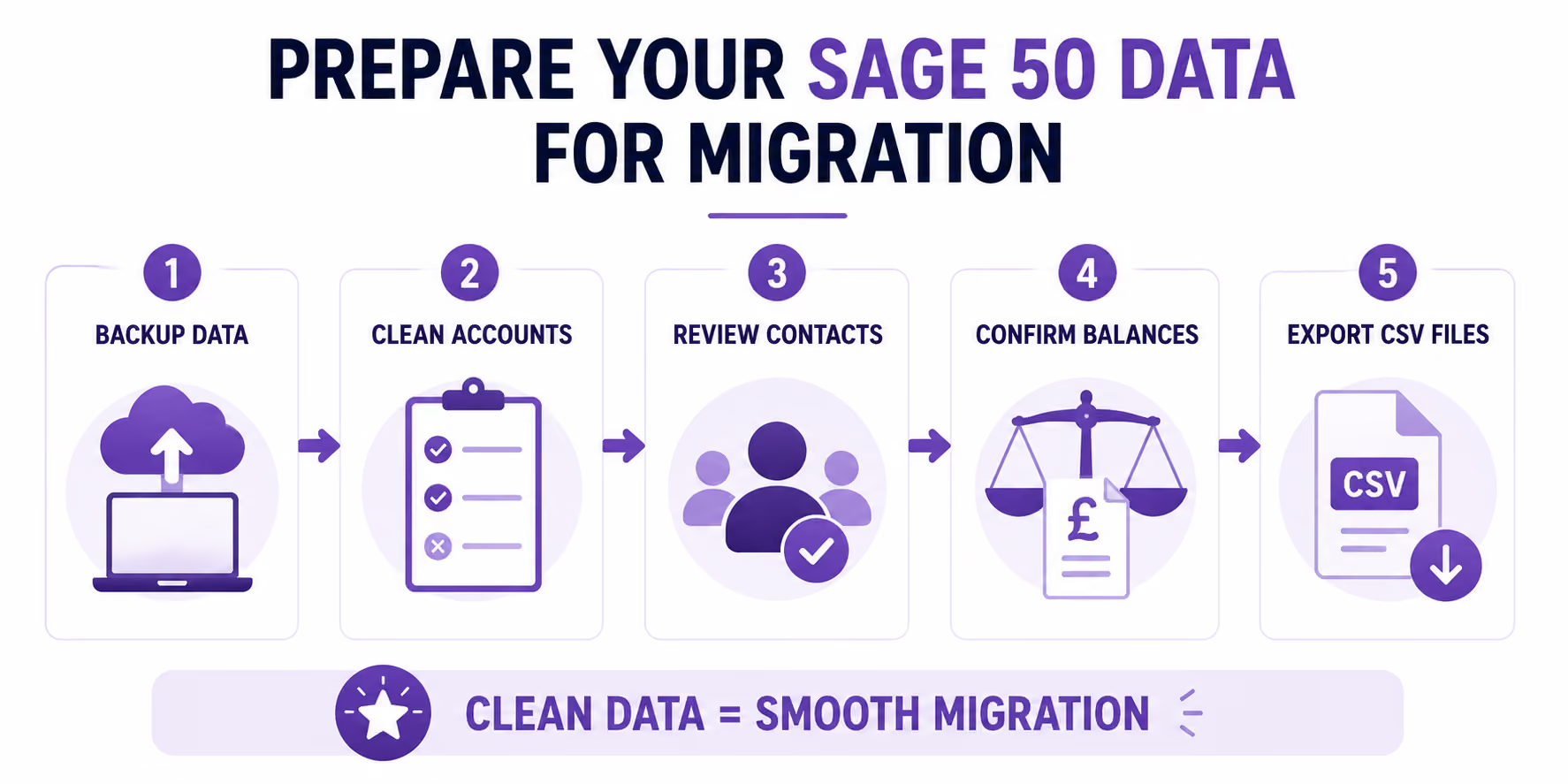
The quality of your Xero setup depends entirely on the quality of the data you move. Migrating messy Sage data produces a messy Xero file.
Step 1: Back Up Your Sage 50 File
Create a full Sage 50 backup before you touch anything. Store it in at least two locations. This is not optional. You need a clean restore point if anything goes wrong.
Step 2: Clean Your Chart of Accounts
Remove account codes you no longer use. Duplicate codes, inactive nominal accounts, and test entries all create confusion when Xero imports them. This cleanup takes an hour and saves three days of reconciliation.
Step 3: Review Your Contacts
Check customers and suppliers for duplicate names, missing addresses, and incorrect VAT numbers. Xero creates contact histories from migration day one. Dirty contact records produce dirty histories.
Step 4: Agree Your Migration Date and Trial Balance
Run a trial balance in Sage as at your migration date. Save it. This is the benchmark your Xero opening balances must match exactly. Print it. Keep it next to you throughout the import process.
Step 5: Export Your Data as CSV
Sage 50 exports your chart of accounts, contacts, customers, suppliers, and transactions as CSV files. Export each category separately. These are the files your migration tool will read.
Which Tools Do UK Practices Use to Migrate Sage 50 to Xero?
There are two main tools used for Sage 50 to Xero migrations in the UK.
How Do You Import Data into Xero After Exporting from Sage 50?
Import your data into Xero in this order. Changing the sequence creates reference errors that take hours to untangle.
• Chart of accounts first, so every other record has somewhere to post
• Contacts second, so invoices and bills can reference them correctly
• Opening balances third, entered manually against your Sage trial balance
• Outstanding invoices and bills fourth, so debtor and creditor ledgers are complete
• Bank transactions last, ready for reconciliation
Set up your Xero organisation settings before you import anything. Year-end date, VAT scheme, currency, and bank accounts must all be correct first. Changing these after import creates complications that are difficult to reverse.
How Do You Verify Your Xero Migration Is Accurate?
The migration is not complete when the import finishes. It is complete when you have confirmed the numbers match.
What Are the Most Common Mistakes in Sage 50 to Xero Migrations?
Real Scenario: How a UK Practice Migrated Sage 50 to Xero in Two Weeks
A 6-person UK practice managing 80 client accounts had been on Sage 50 for nine years. Their biggest concern was not losing historical data that clients regularly asked for in disputes and audits.
They set a year-end migration date, backed up the full Sage file, and spent three days cleaning contacts and removing 140 unused nominal accounts. They used Jet Convert to handle the conversion and imported into a new Xero organisation following the sequence above.
The trial balance in Xero matched Sage within 24 hours of import. They ran both systems in parallel for 10 days before switching off Sage entirely. The Sage archive stayed on a local drive as a reference for records older than three years.
The migration took two weeks from start to finish. It would have taken four if they had skipped the data cleanup.
How Finqube Supports Sage 50 to Xero Migrations
Most practice owners who come to us have already tried to migrate once and stopped when the trial balance did not match. The data preparation step is where most DIY migrations break down.
Our dedicated remote team handles the export cleanup, account code mapping, and import sequencing. Every migration is validated against your final Sage trial balance before we confirm the move is complete. Our AI review software checks the reconciliation at every stage, so you can see exactly where each figure has come from before you sign off.
You do not lose visibility during the move. You gain it.
One month, no contract, to see how it works before you decide.
Ready to move from Sage 50 to Xero?
Finqube's dedicated remote team handles the full migration, validation, and Xero setup. One month, no contract.
Start your free pilotFrequently Asked Questions
Q: Will I lose my transaction history when I migrate from Sage 50 to Xero?
You will not lose access to your history. Most practices migrate two to three years of transactions into Xero and keep the Sage file as an archive for older records. Everything within the migration window transfers into Xero and is searchable from day one.
Q: How long does a Sage 50 to Xero migration take?
A straightforward migration takes two to three weeks when the Sage data is clean. Practices that skip data preparation extend this to four to six weeks. The data cleanup phase is the biggest variable. Do it properly and the rest moves quickly.
Q: Can I run Sage 50 and Xero at the same time during migration?
Yes, and you should. Running both systems in parallel for at least two weeks after migration lets you compare reports and catch any discrepancy before Sage is switched off. Do not turn off Sage until the trial balances match and you have reviewed at least one full reconciliation cycle in Xero.
Q: What happens to my VAT history when I migrate to Xero?
Your submitted VAT returns stay in Sage and are not automatically replicated in Xero. You can manually enter historical VAT return summaries as opening balance entries if you need them visible in Xero. For the current open VAT period, make sure your migration date does not split a quarter. If it does, the open period needs to be bridged carefully between the two systems.
Q: Do I need a specialist to migrate Sage 50 to Xero?
For practices with complex nominal structures, multiple bank accounts, CIS obligations, or previous reconciliation issues, a specialist reduces the risk of errors significantly. The cost of getting it wrong is higher than the cost of getting it right the first time.
Q: What should I do with my Sage 50 licence after migrating to Xero?
Keep the Sage licence active for at least three months after migration. You need it to access the historical data archive and to answer any queries that arise from the transition period. After three months, most practices archive the Sage backup file and let the licence lapse.
Q: Does Xero support Making Tax Digital for UK practices?
Yes. Xero is fully MTD-compatible for VAT and is preparing for MTD for Income Tax, which applies to self-employed individuals and landlords from April 2026. Migrating from Sage 50 to Xero positions your practice ahead of the MTD requirement rather than reacting to it.

.png)